Practice management for therapists
Your practice, organized around every session. The Therapist Dashboard is where you run your day-to-day practice: patients, sessions, notes and therapeutic plans in one place. And you don't start from scratch — the first time you log in, Alchely asks how you work. If you want your appointments here, you turn on Scheduler and publish your availability so patients can book, with the calendar and the meeting link already handled. And you pick the therapy tools that match your method — Constellation, Genogram & Ecomap, Meditation & Visualisation and EMDR today, IFS on the way — so what you do in the room doesn't get left off the screen.
From signing up to your first session
Alchely doesn't leave you staring at an empty dashboard. The first time you log in it walks with you, asks how you work, and leaves your practice set up before you see anyone.
Create your account
Sign up, verify your email and you're in. If you want, turn on two-step verification to protect access to clinical data from day one.
“Let's set up your practice”
A guided welcome asks what you need: analysing and remembering your sessions, running your appointments here, or working with constellations. What you accept is switched on right away; what you skip stays waiting in the tools catalogue.
A tour of your space
An interactive tour shows you where everything is: your daily overview, patients, sessions, therapeutic plans, settings — note language, templates, alerts — notifications and profile. Plus the button to record a live session from any screen.
Add your first patient
You create their file and, when you judge the moment is right, you send them the invitation to their portal yourself: a link valid for seven days. From there they sign consents, keep their diary and see whatever you share with them.
Record your first session
Live, by uploading audio, dictating or typing — even from a photo of your handwritten notes. It processes in the background: you don't wait around, and we tell you when the note is ready.
Adjust as you go
Tools switch on and off from the catalogue whenever you want, and note templates and preferences change at any time. Your practice configures itself as you use it.
See it working
A short walk through the dashboard: what a patient record looks like, how a session gets recorded, and what Alchely hands back afterwards.
One record, every session
Every note, template, and document for a patient lives on the same timeline — nothing scattered across spreadsheets or folders.
Patient Records
Every patient's history — sessions, notes, and documents — lives in one record you can find in seconds.
-
Unified history
All sessions, notes, and files for a patient in a single timeline.
-
Fast search
Find any patient or session in seconds, even years into a practice.
-
Individual, couple and group
A couple and a group each have their own record, with every person inside it and their emails kept separate. A group brings together three to twenty of your patients, and none of them learns from Alchely who else attends.
-
If you work in a centre
When you create a patient, a couple or a group you choose whether it is the centre's or your own, and the lists say which. Alchely for centres
-
Therapeutic plans
Objectives and milestones tailored to each process, evolving with the patient rather than written once.
-
Highlights and agreements
Save any fragment of the notes as a highlight, and the session agreements stay visible to both sides.
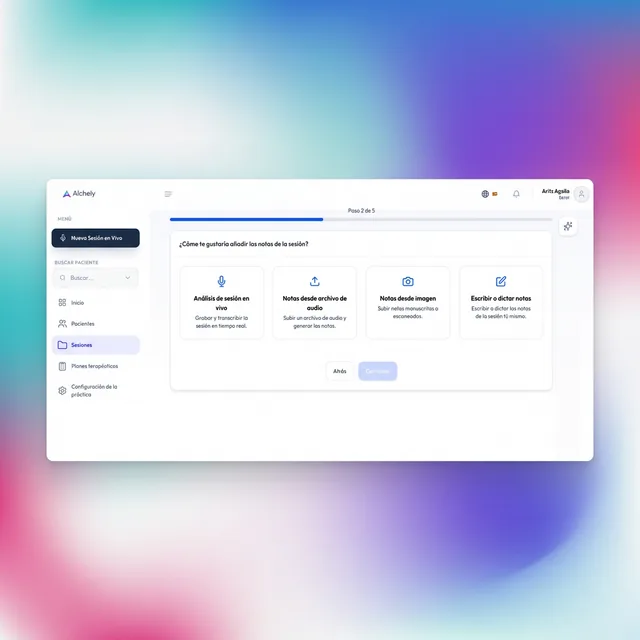
Session Notes
Create your notes with ease. Alchely adapts to your practice, allowing you to capture every insight exactly how you prefer.
-
Write or dictate
Traditional typing or high-precision voice-to-text dictation.
-
From your paper notes
Instantly digitize your handwritten therapeutic journals.
-
From recorded audio
Upload your session audio and receive a structured note.
-
Live session
Real-time note generation during your therapeutic sessions.
-
From your video call
Capture the audio of your Zoom, Google Meet or Teams tab while you sit with the patient, or hold the session in AlchelyMeeting and it records itself.
-
Without touching anything
With Zoom, Google Meet or Teams connected, their summary or transcript arrives on its own when the call ends and the session draft is already there.
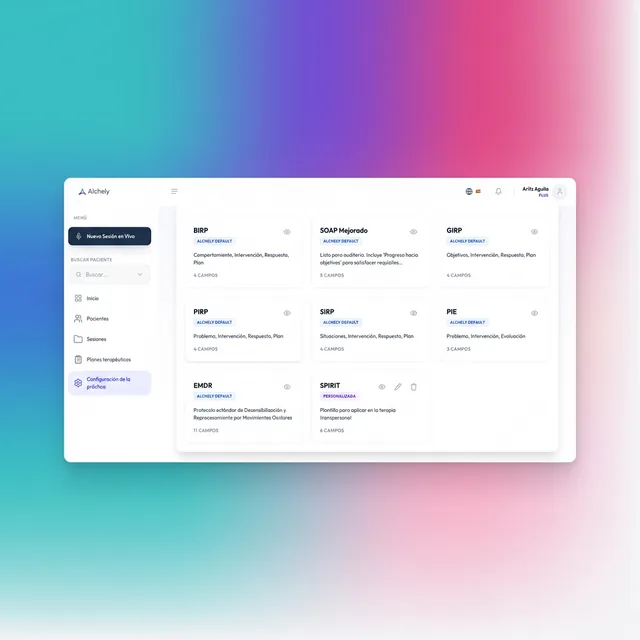
Template Notes
Streamline your practice by applying standardized note structures that ensure quality and consistency across your records.
-
Pre-defined templates
Select from common clinical formats (SOAP, BIRP, GIRP, etc) to speed up your documentation.
-
Custom templates
Design your own note structures that perfectly reflect your unique practice style.
A dashboard built for clinical data
What you keep here is health data, the category that demands the most protection. The dashboard starts from that assumption.
Two-step verification
Turn on a second factor with your authenticator app and protect access to your practice even if your password leaks.
Audit log
Logins, access to clinical data and consent changes are all recorded, so you can always tell what happened and when.
Patient consent
AI processing of a session depends on the patient's explicit consent, which they can revoke themselves from their portal.
Every patient, their own boundary
You only reach your own patients' data, and the patient portal never exposes your clinical notes.
The admin side lives here too
Appointments, video and charges are three tools you adopt separately, but they run on the same dashboard and the same record. And the reports on your work come with the dashboard: no loose accounts, and nothing to reconcile by hand at the end of the month.
Scheduler
You publish your availability and book in three clicks. The Zoom, Meet or Teams link, the patient's email and the event in your calendar happen on their own, and your patients can book themselves from their portal.
See SchedulerAlchelyMeeting
The video call inside Alchely: your patient joins from their portal or with a link, with nothing to install and no account to create, and you have the notes and their history beside the call.
See AlchelyMeetingPayments
You record the charge from the session itself, see what is still unpaid, and Alchely chases it for you by email or WhatsApp. Online payment through your own Stripe account.
See PaymentsReports
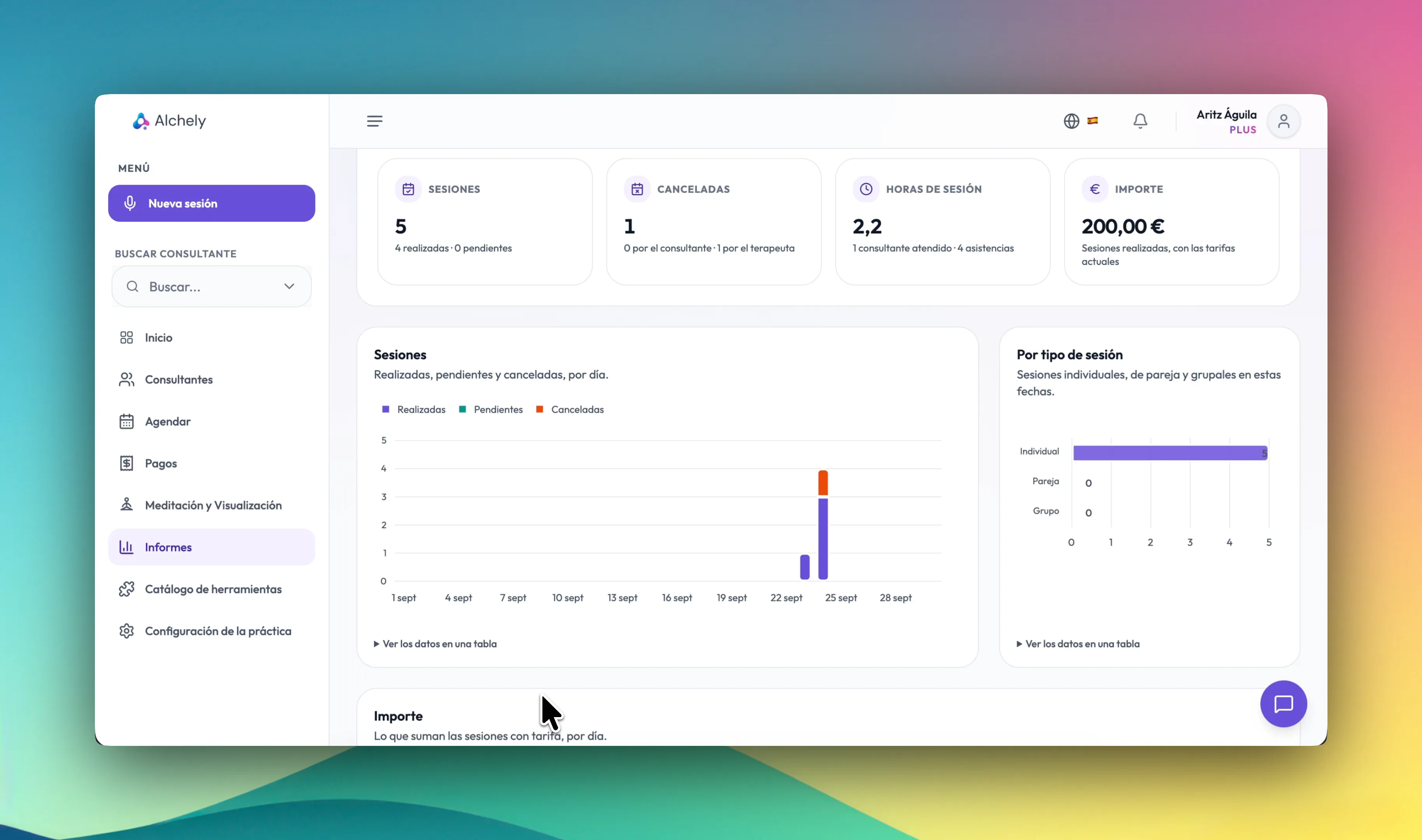
Your sessions at a glance: held, pending and cancelled, by type and by patient. If you set your rates, what they add up to. And the statement for a month or a year in PDF or Excel, which is not an invoice.
Your month, without adding it up by hand
Under Reports you see what you have done over the dates you choose: sessions held, pending and cancelled, session hours and patients seen, by session type and by patient.
If you set your per-session rates, you also see what they add up to. And when you need it, you download the statement for a month or a year as a PDF or Excel file: an informative document, not an invoice. It comes with the dashboard, on any plan.
-
Your rates, optional
Individual, couple or group. Without rates, the report counts sessions and hours.
-
By patient
Filter by a patient, a couple or a group, and download just their statement.
-
If you work in a centre
Your sessions with the centre's patients are counted at its rates; those with your own patients, at yours.
The dashboard is the base; you choose the tools
Augmented Memory to analyse and remember your sessions, Scheduler to run your appointments here, AlchelyMeeting to hold them by video without leaving Alchely, Payments to get paid for them, and Constellation or EMDR to work your method on screen. They switch on and off from the catalogue whenever you want.
And the catalogue isn't closed: the marketplace grows with the methods you ask us for. Internal Family Systems (IFS) is already on the way, and every new tool shows up in the same place — no migration, no separate account, nothing to rebuild.
Discover all the tools