Video sessions for online therapy
Hold your video sessions without leaving Alchely. Start a call on the spot or attach one to a scheduled session, and your patient joins from their portal — with nothing to install and no account to create. And when something is easier drawn, you both have a shared whiteboard.
One room, nothing to set up
Camera, microphone and screen sharing. No OAuth, no third-party account, no other platform's paid plan: there is nothing to connect before your first session.
- A singing bowl that sounds in both rooms. One press to mark the start of a silence or the end of an exercise — or timed to open, wait and close, with the countdown in view for both of you
- Video and audio, with a camera and microphone picker
- A blurred background, which is often the reason a patient hesitates to turn the camera on at all. It is computed frame by frame in their own browser, and the picture never leaves it
- Three views to choose from — both of you, your patient with you small in the corner, or them alone — and each of you picks your own: what a therapist needs to see is not what a patient needs to see
- Text chat in the room, beside the faces rather than instead of them. It is stored nowhere
- Screen sharing, with its sound — and also a tab's sound without its picture, so you can play music or a recording without throwing your browser over the conversation
- It runs in the browser: your patient installs nothing
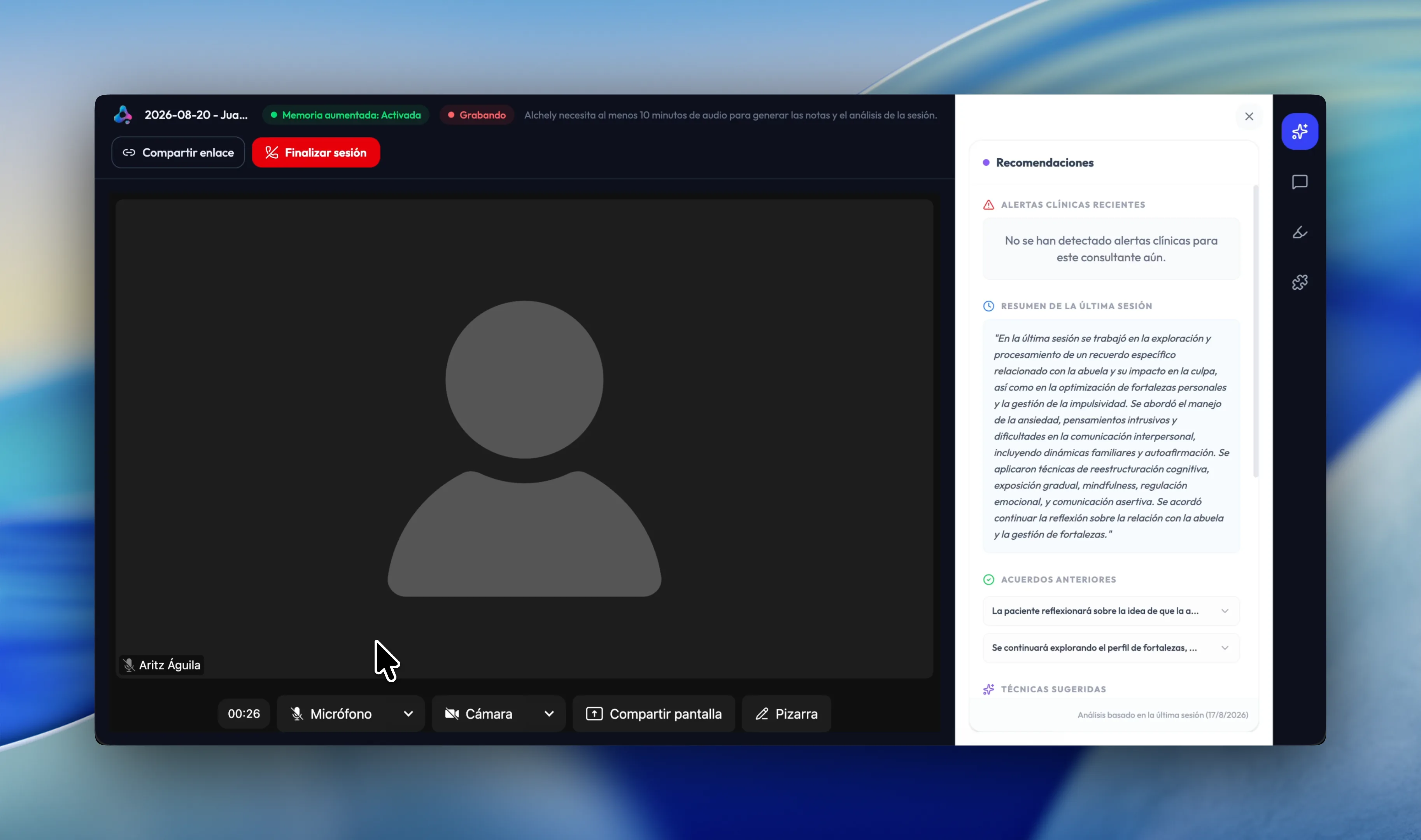
Everything you need, without leaving the call
The room carries a side panel with what you need while you talk. It opens over the video and closes just as fast: no switching tabs, no leaving your patient waiting while you look for something from three months ago.
- Recommendations: what is suggested for this patient, drawn from their whole history
- Chat: ask about the patient and get an answer from what is in their sessions
- Highlights: the fragments you saved from earlier sessions
- Tools: the ones you have adopted, already scoped to this session
- Recommendations and Chat come with Augmented Memory; Highlights and Tools work without it
- In a couples or group session the panel works on the couple or the group, and Chat asks for every member's consent first
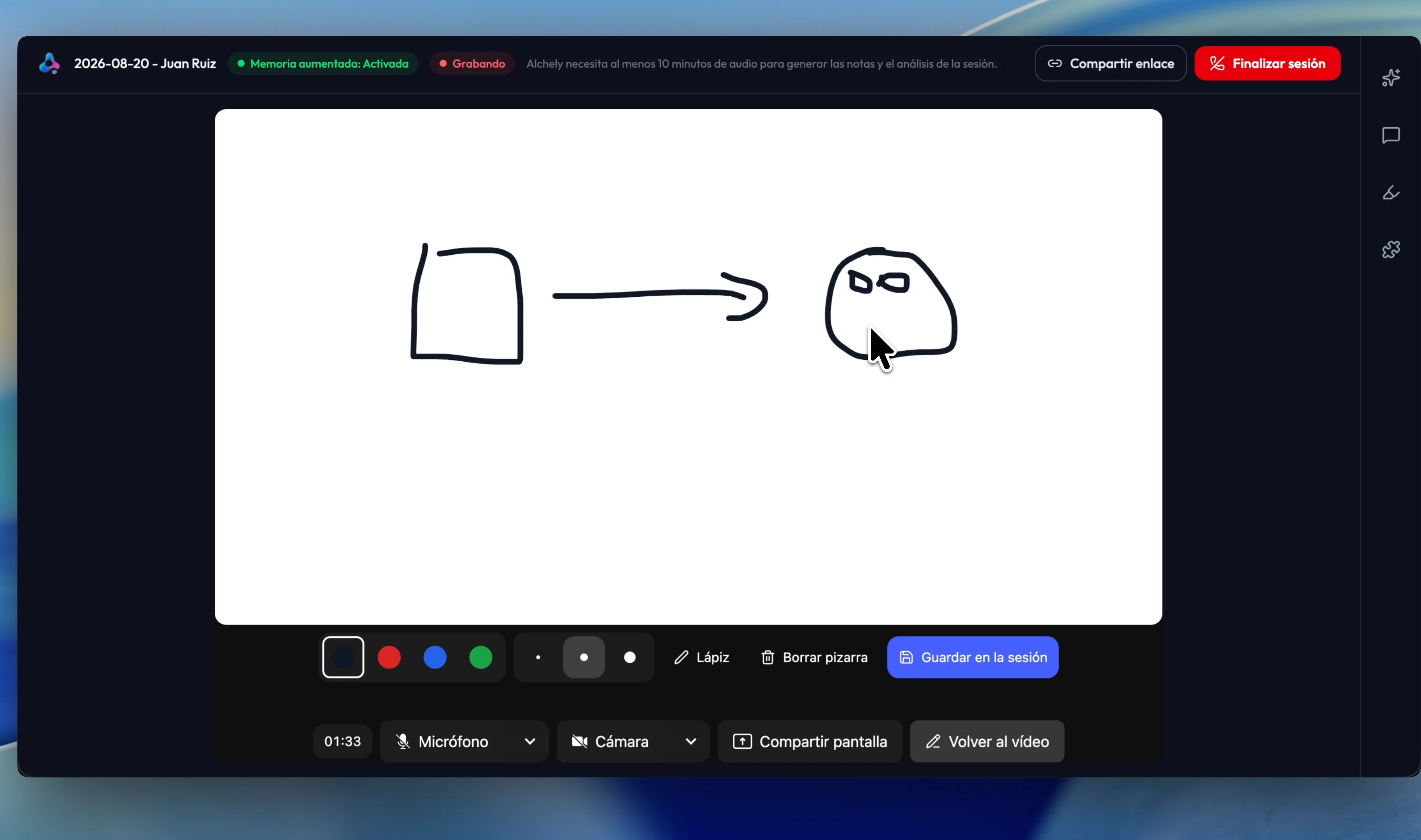
A shared whiteboard, to draw it together
Some things land better drawn. The whiteboard opens over the video and you both draw on it at once — with the mouse, a finger or a stylus — without cutting the conversation short: the audio stays open the whole time the board is up.
- What one of you draws shows up on the other's screen as it happens
- Pen and eraser, four colors and three line widths
- It looks the same on a laptop as on a tablet: the stroke adapts to each screen
- Save it and the board's image stays in the session details, next to its notes, with the date you saved it
- If you don't save it, it never leaves the call
The call and the record, in one place
The room is not a separate window you have to reconcile with the file afterwards. It is the session.
The session starts when the room opens
A booking is a commitment to meet; the session is the clinical work. It begins when you join, with its notes ready to write.
Hang up, and the notes arrive
With Augmented Memory, the recording enters the same pipeline as an uploaded audio file and the session draft appears on its own. The session keeps how long it actually lasted, not how long it was planned for.
Only with consent
Recording does not start unless your patient has accepted the use of AI — and in a couples or group session, unless every one of them has. Without that consent the room works exactly the same — it just does not record.
For a group too
A booked group session opens the same room for everyone. Each member gets the link in their own email, and neither the email nor the invitation names anyone else. The Tools panel opens just as it does with one patient.