Marketplace tool

Meditation and Visualisation

The body scan you have been reading for years, the safe place you recorded once, the induction you wrote for one particular patient. Written or recorded, all in the same place — and playing inside the session, not in a shared window alongside it.

Why screen sharing does not do the job

Guiding a meditation in an online session is done two ways today, and both break at the same point. Share your screen to play the audio and your patient sees your browser — your tabs, your media player — and the faces disappear exactly when they matter most. Play it separately at each end and the two are out of step.

Reading live has a failure of its own: from a document in another window you are looking at the window, not at your patient, and you lose your place every time you glance up.

Here the audio is published into the call as one more track: a single playback, the same one for both of you. The script scrolls on your screen as a teleprompter at the pace you set. Your patient sees the title and how far through you are — and nothing else.

The tool, from the inside

A script, a recording, or both

A meditation is not a file type: some you read live, and some you put into audio months ago. Here it is whatever it holds — script, recording or both — and the session player behaves accordingly without being told.

The editor for a new meditation in Alchely: the title, the instructions, the language, and the script field with its dictate button and a script opening on the [10s] and [gong] tags
The script

Typed or dictated, with its silences written in

Write the meditation or dictate it aloud: the browser transcribes as you speak, which is how you actually write something meant to be said. Every blank line is a pause. And you give it a reading pace, anywhere between 40 and 160 words per minute: a guided meditation is read far below conversational speech — the pauses are the work — so it starts at 90.

But a meditation is mostly what is not said, and that gets written too. [10s] is a ten-second silence and [2m] a two-minute one: the prompter sits on it, counting down. The tag never reaches the screen, the silence lasts what it says at any reading pace, and Alchely adds no breath of its own before a pause you wrote.

[gong] sounds the room's singing bowl for both of you, exactly where you wrote it: at the edge of a silence, which is where a bowl belongs — and not mid-sentence while you reach for the control bar. It takes no time of its own, and only rings while the meditation is playing. Those are the only two tags, and there will not be a third without a mechanism behind it: one the prompter did not act on would be a comment pretending to be an instruction.

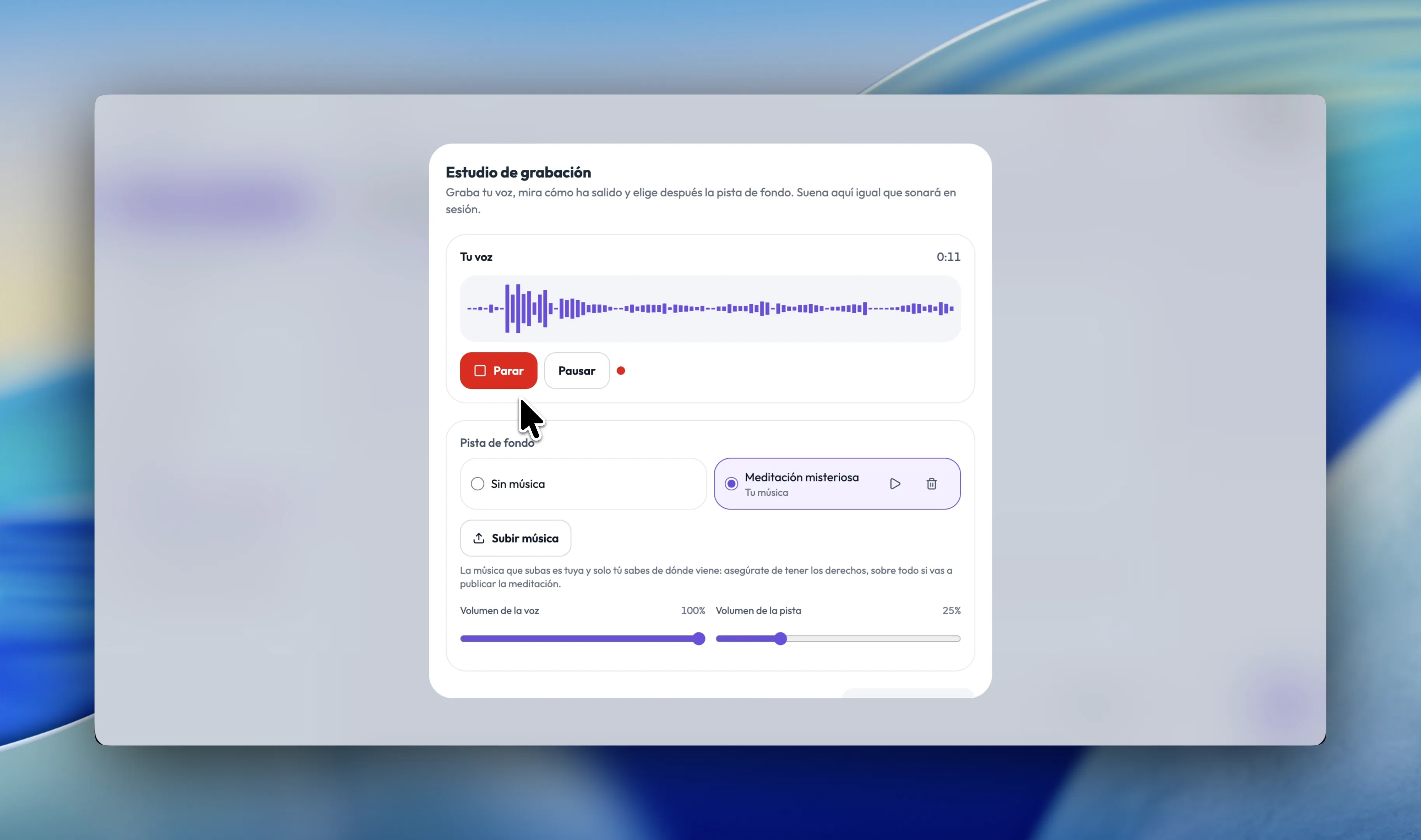
Alchely's recording studio: the waveform of an eleven-second take with the stop and pause buttons, the background track chosen between “No music” and the therapist's own, and the voice level at 100% with the track at 25%
The recording

A studio in the browser, not an audio editor

You record your voice in Alchely, listen back, and choose the background track after hearing how the take came out — because music is chosen against a particular take, not in the abstract. The mix sounds in the studio exactly as it will in session, with your voice and the bed on separate levels.

Or you upload audio you produced elsewhere. What there is not is editing: a take is kept or recorded again. Nor is there synthetic speech or a generated script — your voice being yours is the whole instrument.

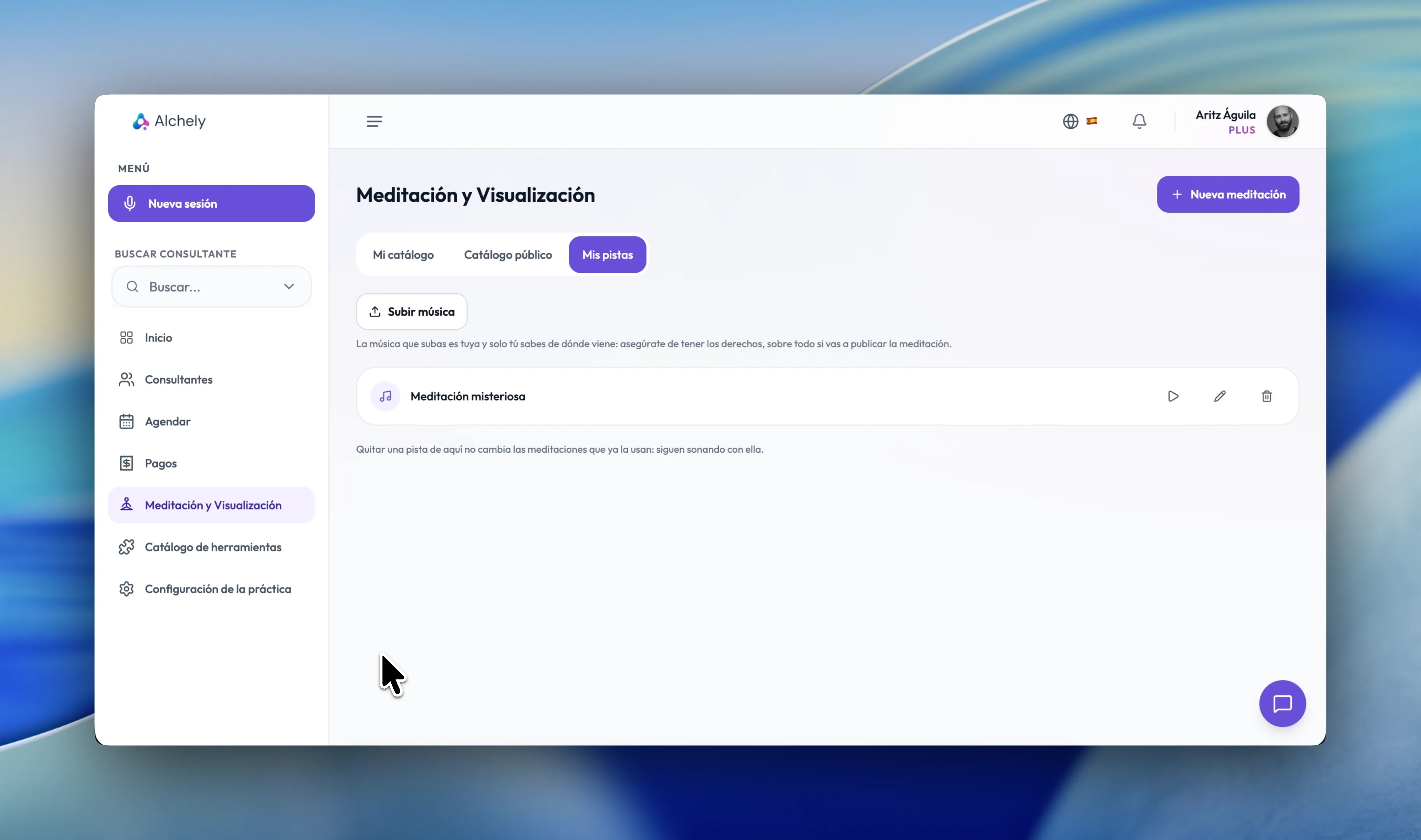
The “My tracks” tab of Meditation & Visualisation: the upload button, the notice that the rights to what you upload are yours to know, and one of your own tracks with its play, rename and remove buttons
The music

Use your own tracks in your meditations

A meditation can have a track playing under it, or none. If you already work with a particular piece, you upload it once to your own shelf and it is available in the studio and in the call, under as many meditations as you like. It belongs to you rather than to one meditation: the same piece sits under several.

On upload you confirm you hold the rights, because you are the only person who knows where it came from — and that counts most if you go on to publish the meditation. Removing a track from your shelf does not change the meditations already using it: they keep playing with it.

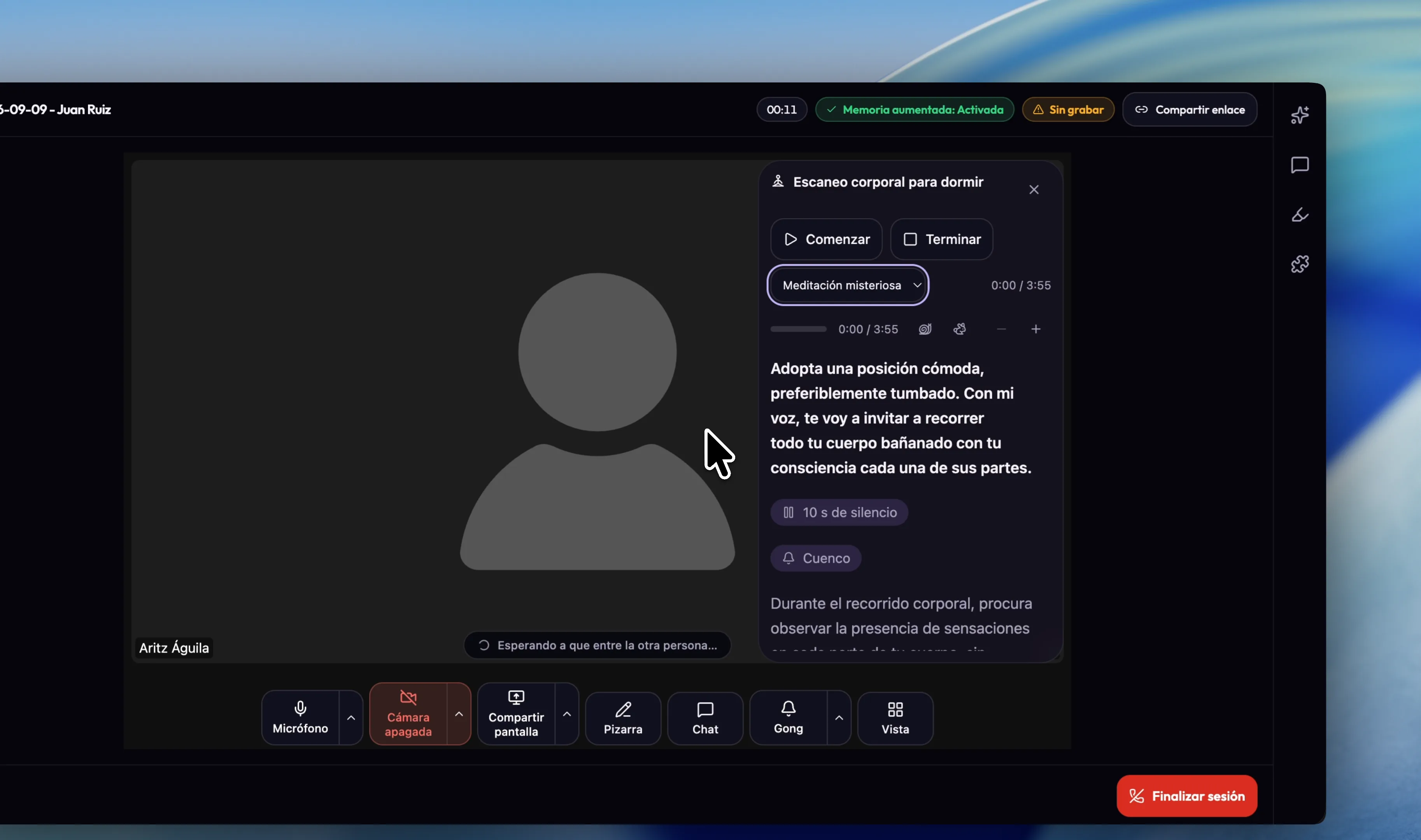
A meditation running inside an AlchelyMeeting session: the prompter over the video with the paragraph being read picked out, the “10s of silence” and “Singing bowl” marks, the track selector and the pace controls, and the Gong button in the call's control bar
In session

Two screens, showing two different things

From the AlchelyMeeting bar you pick the meditation and start it. On your screen the prompter marks the paragraph due and keeps the ones before and after it readable; if you have run ahead or fallen behind, you tap the paragraph you are actually on and the marker moves there. You can also change the pace as you go: the one saved is what its author thought it should be read at, but what it is read at today depends on who is in the room — and the change lasts as long as the reading rather than rewriting the meditation. The text steps up and down through three sizes, and your browser remembers yours: a laptop on the desk is not the same read as a screen across the room.

On your patient's screen, a card saying a meditation has begun — the title, and “Close your eyes and follow your therapist's voice.” — which takes itself away after ten seconds. No progress bar and no clock: somebody with their eyes closed does not need to know there are eleven minutes left, and being told is an invitation to count them. The script never leaves your screen, and neither do the controls: starting, pausing, seeking and ending are yours. You can close the panel without ending the meditation, and if Alchely sees that their screen has stopped following along, it tells you.

Between sessions

The meditation stays in your patient's portal

A guided meditation is practised, not attended. You read it once in the session; what changes anything is your patient putting it on again on Tuesday night — and until now there was nowhere for that to happen.

You hand any of yours to any of your patients and it appears in their portal, to read or to play, with your voice and the bed mixed the way you set them. Read-only: they cannot change anything, and because they read your meditation rather than a copy, what you edit tonight is what they hear tomorrow. Taking it back from one does not take it from the rest.

On their screen the tags read as what they mean — “30s of silence”, “The bell sounds” — because a patient reading [30s] mid-meditation reads it aloud in their head, which is the opposite of silence.

The catalogue

A public catalogue to share with other therapists

Therapists ask each other for scripts constantly, and what stops somebody with a good one is not generosity: it is that handing over a document means losing any claim to it. Publishing a meditation puts it in a catalogue every therapist can see, under your name and the licence you choose — from all rights reserved to CC0. Whoever wants it takes a copy, not a link: they edit it for the way they work, and it still says whose it is. Withdrawing it is one click, and it does not reach into copies already taken.

Every meditation carries the therapies you would use it in and the presenting problems it is for. If you work in a way the list has no word for, you type it in your own words and it is added as it is. Then you filter by therapy, by problem, by language, by whether it is a script, a recording or both, and search over title and instructions. Every card also says how long it runs: the prompter's sum — words, breaths and silences — with your own estimate in front of it where you gave one.

Why use it

What changes when the meditation lives inside the session

It is not that Alchely plays audio: it is that the audio, the script and the two screens stop being four things you have to coordinate yourself while you are guiding.

One playback, not two

The audio goes into the call as one more track. No screen sharing, no two players drifting apart, and no browser of yours showing up on your patient's screen.

Your voice, not a synthetic one

There is no text-to-speech and no AI-generated script. What your patient hears you wrote and you read, which is exactly what makes it work.

Without losing your place

The prompter marks where you are, counts the silences you wrote, and keeps what is coming readable at whatever text size you pick. You can look at your patient and come back to the script without hunting for it.

The music is yours

Silence, or your own. You upload it once to your shelf and it sits under as many meditations as you like, in the studio and in the call.

Publish

Your name and your licence travel with the meditation, and with every copy anyone takes. Withdrawing it is yours to do, whenever you want.

Frequently asked questions

What is the difference between a meditation and a visualisation here?

As a tool, none: both are a script you guide, a recording, or the two together. The distinction is one you make in the tags. The name mentions both because a good share of what gets written with this are visualisations — a safe place, resource installation in EMDR, a hypnotic induction — and somebody looking for that had no reason to open a card that only said “meditation”.

Do I have to record? Do I have to write?

Neither on its own, but at least one of them. A meditation can be a script alone — you read it live, with the background track playing underneath — a recording alone, or both: the same script there to read on the days there is a voice for it, and recorded for the days there is not.

Can I write the pauses into the script?

Yes, and it is how the prompter comes to respect them. [10s] is a ten-second silence and [2m] a two-minute one: the prompter sits on it, counting down, and the tag never reaches the screen. [gong] sounds the room's singing bowl for both of you, taking no time of its own. Those are the only two tags, and there will not be a third without a mechanism behind it: one the prompter did not act on would be a comment pretending to be an instruction. A written silence lasts what it says at any reading pace, and is capped at ten minutes so a typo cannot stall a session.

Can I trust the length shown in the catalogue?

The computed one counts exactly what the prompter then runs: the words at your pace, the breath between paragraphs, and any silences you wrote. What it cannot count is that with a patient in the room you slow down and the last silence runs, so you can write your own estimate in minutes. The card then shows yours first and the prompter's beside it.

What does my patient hear?

The same playback you do, from inside the call. The audio plays in your browser and is published into the room as one more track, so your patient is not running a second copy that drifts out of step with yours. When you end it, the track is withdrawn from the call. If the meditation is a script with a background track, what gets published is the track and your voice goes over it on your usual microphone.

Can my patient see the script?

No. Their screen only says a meditation has begun, with the title, and it takes itself away after ten seconds. There is no progress bar and no clock, deliberately: somebody with their eyes closed does not need to know how much is left. The controls are not theirs either: starting, pausing, seeking and ending are yours, and an instruction arriving from their side is ignored.

Can I use my own music?

Yes. You upload it to your shelf, name it, and it is available in the studio and in the call, under as many meditations as you like. On upload you confirm you hold the rights to use it, including if you go on to publish the meditation — you are the only person who knows where that track came from. Removing it from the shelf does not change the meditations already using it.

Can I give it to a patient to practise at home?

Yes. You hand any of yours to any of your patients and it appears in their portal, to read or to play, with your voice and the bed mixed the way you set them. It is read-only and it is not a copy: they read your meditation, so what you edit tonight is what they hear tomorrow, and taking it back from one does not take it from the rest. The script's tags are shown to them as what they mean — “30s of silence”, “The bell sounds” — rather than raw. If you stop using the tool you stop handing them out, and the ones already handed out go with it.

If I publish a meditation, do I lose it?

No. Publishing makes it visible to other therapists under your name and the licence you choose, and by default that licence reserves every right. Editing it, withdrawing it and deleting it stay with you and nobody else. Whoever adopts it takes a private copy of their own that still says you wrote it, and if you withdraw the original those copies do not vanish from anyone's practice.

Does it work in any browser?

Recording and guiding, yes: the recorder negotiates a format the browser can actually produce rather than assuming one. Dictation is the exception, because Chrome and Safari offer it and Firefox does not; where it is missing the button simply does not appear, and the script is typed as normal.

Do I need a particular plan to use it?

Meditation and Visualisation is one of the Plus plan's tools. You adopt it from the catalogue whenever you want and remove it the same way, and adopting it puts it in your sidebar and in the AlchelyMeeting bar. If you remove it, your meditations stay where they are.

It runs on the same platform as everything else

Add Meditation & Visualisation to your practice whenever you like — no separate account, no separate library.

Try it in your practice